


Story Companion — Campaign Workflow and Marketing App Guide

Campaign workflow · Click a step to navigate · Press SCENARIO icon to change to a different Scenario
Scenario
Story
Press the Scenario button to see different business scenarios.
ReThread Solo Artesanery
UrbanNest Interior design / Virtual staging
AuraCraft Luxury Luxury web service
1
Product Input
2
Campaign Overview
3
Channel Guide
4
Asset Creation
5
Launch & Activate
01

Product Input

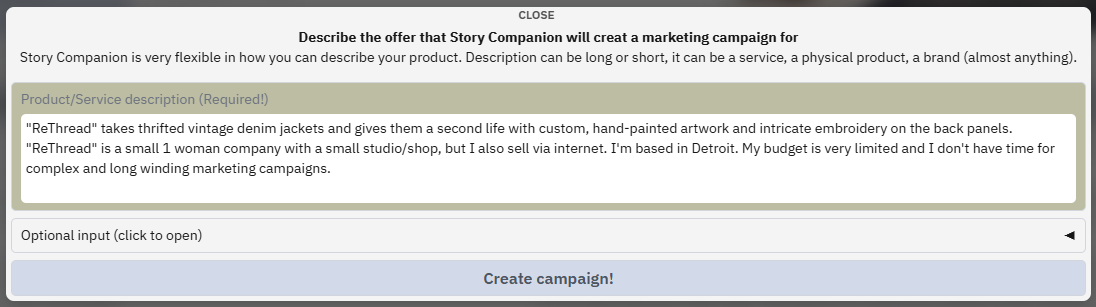
Tell us what you're selling - A product, a service, a brand, anything! The more you share, the smarter your campaign will be.

Product Input Interface
🔍 Click to enlarge
🔍
Behind the scenes: What Story Companion is building from your input
Competitor Analysis
Top 6 direct & indirect competitors with a short overview, description and strnegth and weaknesses.
Target Audience
Extensive analysis including: demographics, interests, online habits, purchasing behavior and much more!
Market Trends
Category momentum, seasonal patterns, emerging consumer behaviours.
Value Proposition
Unique selling points, differentiators and more.
Channel Intelligence
Recommended channels adapted for your product, market and your companies specific needs.
Secure storage
Rest easy knowing your intellectual property is housed in an isolated, high-security Oracle environment, engineered for 99.9% uptime and total data integrity.
What happens next
Story Companion analyses your input — scanning competitors, mapping your audience, spotting trends — and returns a complete campaign strategy and style guide, ready in minutes.
02

Marketing Campaign Overview

Your full go-to-market strategy — visual, structured, and always editable.

Instantly generated. Both documents below were built by Story Companion from your product description alone. Adjust any section at any point — your strategy flexes with you.
Campaign Overview
🔍 Click to enlarge
What's inside the Campaign Overview
Campaign Overview contains: Executive summary · Strategic risks & mitigations · Creative direction brief · Phase timeline (Phases 1–3) · Target audience summary · Channel mix & budget allocation · Key performance indicators · Messaging pillars per segment
Campaign Style Guide
🔍 Click to enlarge
What's inside the Style Guide
Style Guide contains: Brand voice & tone spectrum · Core messaging pillars · Visual colour palette & typography rules · Photography & imagery direction · Channel-specific best practices (Instagram, LinkedIn, Email, etc.)
Your decision
When you're happy with the campaign and style guide (both editable at any time). You check the created Campaign Overview to find your priority channel(s) for Phase 1 — and, if you need a little extra help, you head to Story Companion Tools section to get a step-by-step activation plan created for any channel.
03

Step-by-Step Channel Guide

A personalised activation playbook for your chosen channel — no guesswork.
You also have our built-in Story Companion Assistant as an expert sitting right across your desk. Whether you are looking for help navigating a specific feature, need a fresh perspective on a complex marketing challenge, or just want to bounce some ideas around, your assistant is always ready to collaborate and keep your momentum going.

Selected Channel: TikTok Showing Simple mode reduced channel info.
🔍 Click to enlarge
📋
Step-by-Step Guide Image Replace with your Instagram activation guide screenshot — showing 10–20 ordered action steps
What happens next
Whether you prefer the structured guidance of Story Companion’s step-by-step plans or choose to lean on your own expertise and routines, you remain in complete control. In either case, the platform works alongside you to generate every asset you need—from images and video to copy and slides. Beyond creative output, Story Companion acts as your analytical partner: it uncovers your campaign’s strengths and weaknesses (automatically optimizing your strategy if you want!), generates comprehensive reports, and find connections directly with marketing channels or local marketing agencies.
04

Created Assets

All your campaign materials — generated, branded, and ready to deploy.
You can use your assets directly in your campaigns or as professional mockups and guides for photographers, videographers, or designers.

How assets are created: Story Companion isn’t just an algorithm—it’s a creative partner built on our years of hands-on marketing experience. It weaves your Campaign Style Guide and Strategic Overview together with specific channel needs to craft each asset. While cutting-edge AI models handle the heavy lifting of generating visuals, video, and copy, you remain in the director's chair. You can easily inject your own insights to shape the outcomes, ensuring every piece of content remains perfectly authentic and locked to your brand’s unique human voice.
🖼️
Image
Hero Launch Post
AI-generated images
🎬
Video / Reel
15s Product Reel
Image-to-video · Brand pacing
✍️
Copy
Caption × 3 variants
LLM · Tone matched to guide
📑
Slide / Carousel
5-slide Carousel
Auto-templated · Brand fonts
🔗
Channel Links
Instagram Direct Links
Publish · Schedule · Insights
Add Asset Type
More assets here
e.g. Story, Email, Ad banner
What happens next
With assets ready, you activate and publish your professional Marketing Campaign - use a Story Companion generated step-by-step plan if needed. You can then track campaign performance against the goals set in your Strategic Overview and in your Channels.
05

Launch, Monitor & Iterate

Publish, track performance, and plan your next phase — following the created plans for your marketing campaign.

Campaign Activated

Your complete marketing strategy — from product brief to live channel assets — was created end-to-end inside one browser window.

Try StoryCompanion Free →
The cycle continues: Return to your Campaign Overview at any time to start the next channel, enter a new campaign phase, or refine your strategy as results come in. Story Companion grows with your campaign.
×